# Flic to PWA WebPush Backend
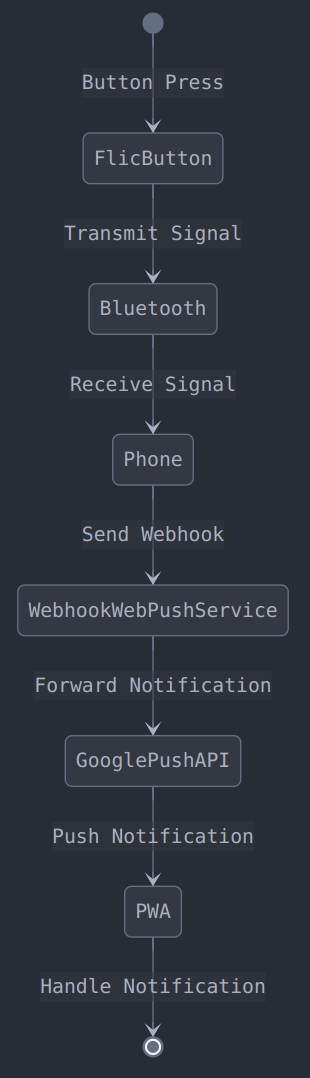
This project provides a self-hosted backend service that listens for HTTP requests from Flic smart buttons and triggers Web Push notifications to specific Progressive Web App (PWA) instances. The goal is to allow a Flic button press (Single Click, Double Click, Hold) to trigger actions within the PWA via push messages handled by a Service Worker.
It's designed to be run as a Docker container and integrated with Traefik v3 for SSL termination and routing.
## Features
* Receives GET requests on `/flic-webhook`.
* Uses HTTP headers `Button-Name` and `Timestamp` from the Flic request.
* Gets `click_type` from query parameter.
* Looks up the target PWA push subscription based on the `Button-Name` header in a JSON file.
* Sends a Web Push notification containing the click details (action, button, timestamp) to the corresponding PWA subscription.
* Integrates with Traefik v3 via Docker labels.
* Configurable via environment variables (`.env` file).
* Optional bearer token authentication for securing the Flic webhook endpoint.
* CORS configuration for allowing requests (needed if your PWA management interface interacts with this service, although not strictly necessary for the Flic->Backend->PWA push flow itself).
## Prerequisites
* **Docker:** [Install Docker](https://docs.docker.com/engine/install/)
* **Traefik:** A running Traefik v3 instance configured with SSL (Let's Encrypt recommended) and connected to a Docker network named `traefik`. You need to know your certificate resolver name.
* **Domain Name:** A domain or subdomain pointing to your Traefik instance (e.g., `webpush.virtonline.eu`). This will be used for the webhook URL.
* **Flic Hub/Service:** Configured to send HTTP requests for button actions. You'll need the serial number(s) of your Flic button(s).
* **Node.js & npm/npx (Optional):** Needed only locally to generate VAPID keys easily. Not required for running the container.
* **PWA Push Subscription Details:** You need to obtain the Push Subscription object (containing `endpoint`, `keys.p256dh`, `keys.auth`) from your PWA after the user grants notification permission.
## System Architecture
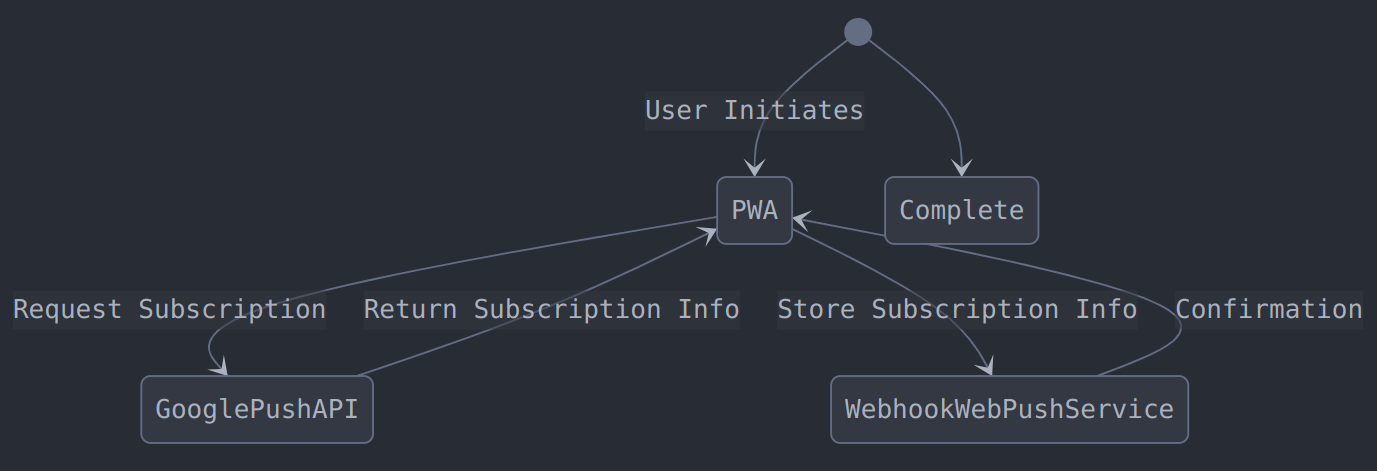
### Subscription Flow
 ### Interaction Flow
 ## Project Structure
## Setup
1. **Clone the Repository:**
```bash
git clone https://gitea.virtonline.eu/2HoursProject/flic-webhook-webpush.git
cd flic-webhook-webpush
```
2. **Generate VAPID Keys:**
Web Push requires VAPID keys for security. Generate them once and store them into `.env`. You can use `npx`:
```bash
npx web-push generate-vapid-keys
```
This will output a Public Key and a Private Key.
3. **Configure Environment Variables:**
* Copy the example `.env` file:
```bash
cp .env.example .env
```
* Edit the `.env` file with your specific values:
* `VAPID_PUBLIC_KEY`: The public key generated in step 2. **Your PWA will also need this key** when it subscribes to push notifications.
* `VAPID_PRIVATE_KEY`: The private key generated in step 2. **Keep this secret!**
* `VAPID_SUBJECT`: A `mailto:` or `https:` URL identifying you or your application (e.g., `mailto:admin@yourdomain.com`). Used by push services to contact you.
* `PORT`: (Default: `3000`) The internal port the Node.js app listens on. Traefik will map to this.
* `SUBSCRIPTIONS_FILE`: (Default: `/app/subscriptions.json`) The path *inside the container* where the button-to-subscription mapping is stored.
* `FLIC_SECRET`: (Optional) Set a strong, random secret string if you want to secure the webhook endpoint using Bearer token authentication. Generate with `openssl rand -hex 32` or a password manager.
* `ALLOWED_ORIGINS`: Comma-separated list of domains allowed by CORS. Include your PWA's domain if it needs to interact directly (e.g., for setup). Example: `https://my-pwa.com`.
* `ALLOWED_METHODS`: (Default: `POST,OPTIONS`) Standard methods needed.
* `ALLOWED_HEADERS`: (Default: `Content-Type,Authorization`) Standard headers needed.
* `MAX_NOTIFICATION_RETRIES`: (Default: `3`) Number of retry attempts for failed push notifications. Must be a number.
* `INITIAL_RETRY_DELAY_MS`: (Default: `1000`) Initial delay in milliseconds before first retry. Must be a number.
* `DNS_TIMEOUT_MS`: (Default: `5000`) DNS resolution timeout in milliseconds. Must be a number.
* `HTTP_TIMEOUT_MS`: (Default: `10000`) HTTP request timeout in milliseconds. Must be a number.
* `TRAEFIK_SERVICE_HOST`: Your public domain for this service (e.g., `webpush.virtonline.eu`).
* `TRAEFIK_CERT_RESOLVER`: The name of your TLS certificate resolver configured in Traefik (e.g., `le`, `myresolver`).
4. **Configure Traefik Labels:**
* Copy the example `labels` file:
```bash
cp labels.example labels
```
* **Important:** Edit the `labels` file. Replace `${TRAEFIK_SERVICE_HOST}`, `${TRAEFIK_CERT_RESOLVER}`, and `${PORT}` with the *actual values* from your `.env` file, as `docker run` does not substitute variables in label files.
* Example replacement: `Host(\`${TRAEFIK_SERVICE_HOST}\`)` becomes `Host(`webpush.virtonline.eu`)`.
* `traefik.http.routers.flic-webhook.tls.certresolver=${TRAEFIK_CERT_RESOLVER}` becomes `traefik.http.routers.flic-webhook.tls.certresolver=myresolver`.
* `traefik.http.services.flic-webhook.loadbalancer.server.port=${PORT}` becomes `traefik.http.services.flic-webhook.loadbalancer.server.port=3000`.
5. **Prepare Subscription Mapping File:**
* Edit the `subscriptions.json` file
* Add entries mapping your Flic button's serial number (as a lowercase string key) to the PWA `PushSubscription` object.
```json
{
"game": { // <-- Replace with your actual Flic Button name (lowercase recommended)
"endpoint": "https://your_pwa_push_endpoint...",
"expirationTime": null,
"keys": {
"p256dh": "YOUR_PWA_SUBSCRIPTION_P256DH_KEY",
"auth": "YOUR_PWA_SUBSCRIPTION_AUTH_KEY"
}
}
// Add more entries for other buttons if needed
}
```
* Ensure this file contains valid JSON.
## Running the Service
1. **Build the Docker Image:**
Make sure you are in the `flic-webhook-webpush` directory.
```bash
docker build -t flic-webhook-webpush:latest .
```
2. **Run the Container:**
This command runs the container in detached mode (`-d`), names it, connects it to the `traefik` network, passes environment variables from the `.env` file, applies the Traefik labels from the `labels` file, and mounts the `subscriptions.json` file into the container.
```bash
docker run -d --name flic-webhook-webpush \
--network traefik \
--env-file .env \
--label-file labels \
--mount type=bind,src=./subscriptions.json,dst=/app/subscriptions.json \
flic-webhook-webpush:latest
```
3. **Check Logs:**
Monitor the container logs to ensure it started correctly and to see incoming webhook requests or errors.
```bash
docker logs -f flic-webhook-webpush
```
You should see messages indicating the server started, configuration details, and subscription loading status.
4. **Verify Traefik:** Check your Traefik dashboard to ensure the `flic-webhook-webpush` service and router are discovered and healthy.
## Flic Button Configuration
In your Flic app or Flic Hub SDK interface:
1. Select your Flic button.
2. Add an "Internet Request" action.
3. Fill in the following details:
* Set `GET` method.
* Set URL with query parameter: `https://webpush.virtonline.eu/flic-webhook?click_type=SingleClick`
* Add headers:
* Key: `Authorization`
* Value: `Bearer ` (Replace `` with the actual secret from your `.env` file).
* It should look like this:
* Tap on `Save action`.
4. Repeat for Double Click and/or Hold events.
## API Endpoint
* **`GET /flic-webhook`**
* **Description:** Receives Flic button events.
* **Authentication:** Optional Bearer token via `Authorization` header if `FLIC_SECRET` is configured.
* **Query Parameters:**
* `click_type`: The type of button press (SingleClick, DoubleClick, or Hold)
* **Responses:**
* `200 OK`: Webhook received, push notification sent successfully.
* `400 Bad Request`: Missing `Button-Name` header or `click_type` query parameter.
* `401 Unauthorized`: Missing or invalid Bearer token (if `FLIC_SECRET` is enabled).
* `404 Not Found`: No subscription found in `subscriptions.json` for the given `Button-Name`.
* `410 Gone`: The push subscription associated with the button was rejected by the push service (likely expired or revoked).
* `500 Internal Server Error`: Failed to send the push notification for other reasons.
## Testing the Webhook
Once your service is up and running, you can test the webhook endpoint using curl or any API testing tool:
**Note:** In the command below, replace `a74181969a613c545d66c1e436e75c1e4a6` with your actual FLIC_SECRET value from your .env file.
```bash
curl -X GET "https://webpush.virtonline.eu/flic-webhook?click_type=SingleClick" \
-H "Authorization: Bearer a74181969a613c545d66c1e436e75c1e4a6" \
-H "Button-Name: Game" \
-H "Timestamp: 2025-03-26T01:10:20Z"
```
The expected response should be:
```json
{"message":"Push notification sent successfully"}
```
If successful, the above response indicates that:
1. Your webhook endpoint is properly configured
2. The button ID was found in your subscriptions.json file
3. The web push notification was successfully sent to the registered PUSH API endpoint (e.g. https://jmt17.google.com/fcm/send/cf907M...)
If you receive a different response, refer to the Troubleshooting section below.
## Troubleshooting
* **Check Backend Logs:** `docker logs flic-webhook-webpush`. Look for errors related to configuration, file access, JSON parsing, authentication, or sending push notifications.
* The server logs all headers received from Flic requests to help with debugging. Look for lines starting with `DEBUG - All headers received:` to see all headers sent by the Flic button.
* **Check Traefik Logs:** `docker logs traefik`. Look for routing errors or certificate issues.
* **Verify `.env`:** Ensure all required variables are set correctly, especially VAPID keys and Traefik settings.
* **Verify `labels`:** Double-check that variables were correctly substituted manually and match your `.env` and Traefik setup.
* **Verify `subscriptions.json`:** Ensure it's valid JSON and the button serial number (key) matches exactly what Flic sends (check backend logs for "Received webhook: Button=..."). Check if the subscription details are correct. Case sensitivity matters for the JSON keys (button serials).
* **Check Flic Configuration:** Ensure the URL, Method, Body, and Headers (especially `Content-Type` and `Authorization` if used) are correct in the Flic action setup. Use `curl` or Postman to test the endpoint manually first.
* **PWA Service Worker:** Remember that the PWA needs a correctly registered Service Worker to receive and handle the incoming push messages. Ensure the PWA subscribes using the *same* `VAPID_PUBLIC_KEY` configured in the backend's `.env`.
## Project Structure
## Setup
1. **Clone the Repository:**
```bash
git clone https://gitea.virtonline.eu/2HoursProject/flic-webhook-webpush.git
cd flic-webhook-webpush
```
2. **Generate VAPID Keys:**
Web Push requires VAPID keys for security. Generate them once and store them into `.env`. You can use `npx`:
```bash
npx web-push generate-vapid-keys
```
This will output a Public Key and a Private Key.
3. **Configure Environment Variables:**
* Copy the example `.env` file:
```bash
cp .env.example .env
```
* Edit the `.env` file with your specific values:
* `VAPID_PUBLIC_KEY`: The public key generated in step 2. **Your PWA will also need this key** when it subscribes to push notifications.
* `VAPID_PRIVATE_KEY`: The private key generated in step 2. **Keep this secret!**
* `VAPID_SUBJECT`: A `mailto:` or `https:` URL identifying you or your application (e.g., `mailto:admin@yourdomain.com`). Used by push services to contact you.
* `PORT`: (Default: `3000`) The internal port the Node.js app listens on. Traefik will map to this.
* `SUBSCRIPTIONS_FILE`: (Default: `/app/subscriptions.json`) The path *inside the container* where the button-to-subscription mapping is stored.
* `FLIC_SECRET`: (Optional) Set a strong, random secret string if you want to secure the webhook endpoint using Bearer token authentication. Generate with `openssl rand -hex 32` or a password manager.
* `ALLOWED_ORIGINS`: Comma-separated list of domains allowed by CORS. Include your PWA's domain if it needs to interact directly (e.g., for setup). Example: `https://my-pwa.com`.
* `ALLOWED_METHODS`: (Default: `POST,OPTIONS`) Standard methods needed.
* `ALLOWED_HEADERS`: (Default: `Content-Type,Authorization`) Standard headers needed.
* `MAX_NOTIFICATION_RETRIES`: (Default: `3`) Number of retry attempts for failed push notifications. Must be a number.
* `INITIAL_RETRY_DELAY_MS`: (Default: `1000`) Initial delay in milliseconds before first retry. Must be a number.
* `DNS_TIMEOUT_MS`: (Default: `5000`) DNS resolution timeout in milliseconds. Must be a number.
* `HTTP_TIMEOUT_MS`: (Default: `10000`) HTTP request timeout in milliseconds. Must be a number.
* `TRAEFIK_SERVICE_HOST`: Your public domain for this service (e.g., `webpush.virtonline.eu`).
* `TRAEFIK_CERT_RESOLVER`: The name of your TLS certificate resolver configured in Traefik (e.g., `le`, `myresolver`).
4. **Configure Traefik Labels:**
* Copy the example `labels` file:
```bash
cp labels.example labels
```
* **Important:** Edit the `labels` file. Replace `${TRAEFIK_SERVICE_HOST}`, `${TRAEFIK_CERT_RESOLVER}`, and `${PORT}` with the *actual values* from your `.env` file, as `docker run` does not substitute variables in label files.
* Example replacement: `Host(\`${TRAEFIK_SERVICE_HOST}\`)` becomes `Host(`webpush.virtonline.eu`)`.
* `traefik.http.routers.flic-webhook.tls.certresolver=${TRAEFIK_CERT_RESOLVER}` becomes `traefik.http.routers.flic-webhook.tls.certresolver=myresolver`.
* `traefik.http.services.flic-webhook.loadbalancer.server.port=${PORT}` becomes `traefik.http.services.flic-webhook.loadbalancer.server.port=3000`.
5. **Prepare Subscription Mapping File:**
* Edit the `subscriptions.json` file
* Add entries mapping your Flic button's serial number (as a lowercase string key) to the PWA `PushSubscription` object.
```json
{
"game": { // <-- Replace with your actual Flic Button name (lowercase recommended)
"endpoint": "https://your_pwa_push_endpoint...",
"expirationTime": null,
"keys": {
"p256dh": "YOUR_PWA_SUBSCRIPTION_P256DH_KEY",
"auth": "YOUR_PWA_SUBSCRIPTION_AUTH_KEY"
}
}
// Add more entries for other buttons if needed
}
```
* Ensure this file contains valid JSON.
## Running the Service
1. **Build the Docker Image:**
Make sure you are in the `flic-webhook-webpush` directory.
```bash
docker build -t flic-webhook-webpush:latest .
```
2. **Run the Container:**
This command runs the container in detached mode (`-d`), names it, connects it to the `traefik` network, passes environment variables from the `.env` file, applies the Traefik labels from the `labels` file, and mounts the `subscriptions.json` file into the container.
```bash
docker run -d --name flic-webhook-webpush \
--network traefik \
--env-file .env \
--label-file labels \
--mount type=bind,src=./subscriptions.json,dst=/app/subscriptions.json \
flic-webhook-webpush:latest
```
3. **Check Logs:**
Monitor the container logs to ensure it started correctly and to see incoming webhook requests or errors.
```bash
docker logs -f flic-webhook-webpush
```
You should see messages indicating the server started, configuration details, and subscription loading status.
4. **Verify Traefik:** Check your Traefik dashboard to ensure the `flic-webhook-webpush` service and router are discovered and healthy.
## Flic Button Configuration
In your Flic app or Flic Hub SDK interface:
1. Select your Flic button.
2. Add an "Internet Request" action.
3. Fill in the following details:
* Set `GET` method.
* Set URL with query parameter: `https://webpush.virtonline.eu/flic-webhook?click_type=SingleClick`
* Add headers:
* Key: `Authorization`
* Value: `Bearer ` (Replace `` with the actual secret from your `.env` file).
* It should look like this:
* Tap on `Save action`.
4. Repeat for Double Click and/or Hold events.
## API Endpoint
* **`GET /flic-webhook`**
* **Description:** Receives Flic button events.
* **Authentication:** Optional Bearer token via `Authorization` header if `FLIC_SECRET` is configured.
* **Query Parameters:**
* `click_type`: The type of button press (SingleClick, DoubleClick, or Hold)
* **Responses:**
* `200 OK`: Webhook received, push notification sent successfully.
* `400 Bad Request`: Missing `Button-Name` header or `click_type` query parameter.
* `401 Unauthorized`: Missing or invalid Bearer token (if `FLIC_SECRET` is enabled).
* `404 Not Found`: No subscription found in `subscriptions.json` for the given `Button-Name`.
* `410 Gone`: The push subscription associated with the button was rejected by the push service (likely expired or revoked).
* `500 Internal Server Error`: Failed to send the push notification for other reasons.
## Testing the Webhook
Once your service is up and running, you can test the webhook endpoint using curl or any API testing tool:
**Note:** In the command below, replace `a74181969a613c545d66c1e436e75c1e4a6` with your actual FLIC_SECRET value from your .env file.
```bash
curl -X GET "https://webpush.virtonline.eu/flic-webhook?click_type=SingleClick" \
-H "Authorization: Bearer a74181969a613c545d66c1e436e75c1e4a6" \
-H "Button-Name: Game" \
-H "Timestamp: 2025-03-26T01:10:20Z"
```
The expected response should be:
```json
{"message":"Push notification sent successfully"}
```
If successful, the above response indicates that:
1. Your webhook endpoint is properly configured
2. The button ID was found in your subscriptions.json file
3. The web push notification was successfully sent to the registered PUSH API endpoint (e.g. https://jmt17.google.com/fcm/send/cf907M...)
If you receive a different response, refer to the Troubleshooting section below.
## Troubleshooting
* **Check Backend Logs:** `docker logs flic-webhook-webpush`. Look for errors related to configuration, file access, JSON parsing, authentication, or sending push notifications.
* The server logs all headers received from Flic requests to help with debugging. Look for lines starting with `DEBUG - All headers received:` to see all headers sent by the Flic button.
* **Check Traefik Logs:** `docker logs traefik`. Look for routing errors or certificate issues.
* **Verify `.env`:** Ensure all required variables are set correctly, especially VAPID keys and Traefik settings.
* **Verify `labels`:** Double-check that variables were correctly substituted manually and match your `.env` and Traefik setup.
* **Verify `subscriptions.json`:** Ensure it's valid JSON and the button serial number (key) matches exactly what Flic sends (check backend logs for "Received webhook: Button=..."). Check if the subscription details are correct. Case sensitivity matters for the JSON keys (button serials).
* **Check Flic Configuration:** Ensure the URL, Method, Body, and Headers (especially `Content-Type` and `Authorization` if used) are correct in the Flic action setup. Use `curl` or Postman to test the endpoint manually first.
* **PWA Service Worker:** Remember that the PWA needs a correctly registered Service Worker to receive and handle the incoming push messages. Ensure the PWA subscribes using the *same* `VAPID_PUBLIC_KEY` configured in the backend's `.env`.